
• Privacy Policy
Halder Consulting, Inc.
  • Home
  • Store
  • Access Blog
  • WordPress Hosting
  • VIP Login
Select Page
MS Access Runtime Error (2176): “The setting for this property is too long.”

MS Access Runtime Error (2176): “The setting for this property is too long.”

by Jonathan Halder | Mar 7, 2022 | MS Access Queries, MS Access Forms

This error occurs because, drum-roll please…. The setting for this property is too long. So in this particular case, the developer was trying to create a long SQL string using multiple UNIONs with a complex query and trying to set this string to the RowSource...

Gotcha! You thought you deleted a subform record but…

Gotcha! You thought you deleted a subform record but…

by Jonathan Halder | Jun 18, 2021 | MS Access Queries, MS Access Forms, MS Access

I recently experienced a frustrating issue that had me scratching my head for a while. I had a PO form with a Line Item subform and I could edit lines and when I tried to delete a line it was removed from the subform. BUT… If I closed and reopened the same PO...

Print button on Ribbon prints form instead of report

Print button on Ribbon prints form instead of report

by Jonathan Halder | Jun 4, 2021 | MS Access Forms, MS Access, MS Access Reports

So I had a form that opened a report using a function in another module using DoCmd.OpenReport. This worked fine and the report popped open and appeared to be the active object on the screen. However, it was not. The behavior this caused was that when I clicked on the...

Friendly Form Auditing in Microsoft Access

Friendly Form Auditing in Microsoft Access

by Jonathan Halder | Jun 3, 2021 | MS Access Forms, MS Access Features, MS Access

Recently, a customer requested that all changes to their form be logged and added to the email that is sent to the project manager associated with the project assigned to the form.  I found some code to walk a form during the BeforeUpdate routine and look for and...

Centering content on a form using Layouts

Centering content on a form using Layouts

by Jonathan Halder | Nov 30, 2020 | MS Access Forms, MS Access Features, MS Access

As you mention, you could determine the available screen space.  You are going to have a somewhat complex job because you will have to set the top and left of every visible control on the screen.  That is one way of doing it that will work. The other way would be to...
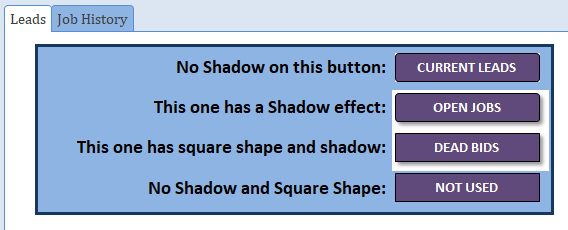
Wrong background colors on buttons with shadows

Wrong background colors on buttons with shadows

by Jonathan Halder | Oct 12, 2020 | MS Access Forms

Jon: Fix is either in the on open or on click events Jon: The issue occurs for me only when hovering over the button. See attached database for the simple workaround solution for this issue. I do think this is a bug in Access but at least there is a workaround for it....

« Older Entries

Recent Posts

  • MS Access Runtime Error (2176): “The setting for this property is too long.”
  • What do those error codes mean?
  • Your Access Application has Crashed! What to do?
  • Gotcha! You thought you deleted a subform record but…
  • Print button on Ribbon prints form instead of report

Recent Comments

  • Willie Clark on Black Leather High Top Sneakers
  • Willie Clark on Navy Leather High-Top Sneakers
  • Willie Clark on Black Well-Worn Sneakers
  • Willie Clark on Grey Well-Worn Sneakers
  • Willie Clark on Black Leather Safety Backpack

Archives

  • March 2022
  • January 2022
  • June 2021
  • November 2020
  • October 2020
  • September 2020
  • August 2020
  • July 2020
  • June 2020

Categories

  • MS Access Tables
  • MS Access Queries
  • MS Access Forms
  • MS Access Features
  • MS Access
  • MS Access Reports
  • MS Access VBA Coding

Meta

  • Log in
  • Entries feed
  • Comments feed
  • WordPress.org

FREE TEXT

Energistically benchmark focused growth strategies via superior supply chains. Compellingly reintermediate mission-critical potentialities whereas cross functional scenarios. Phosfluorescently re-engineer distributed processes without standardized supply chains.

RECENT POSTS

  • MS Access Runtime Error (2176): “The setting for this property is too long.”
  • What do those error codes mean?
  • Your Access Application has Crashed! What to do?
  • Gotcha! You thought you deleted a subform record but…
  • Print button on Ribbon prints form instead of report

CATEGORIES

  • MS Access Tables
  • MS Access Queries
  • MS Access Forms
  • MS Access Features
  • MS Access
  • MS Access Reports
  • MS Access VBA Coding

META

  • Log in
  • Entries feed
  • Comments feed
  • WordPress.org

SEARCH

Welcome to our Access Blog

We have decades of experience with Microsoft Access that we’d love to share with you.

TAG CLOUD

Access Combo Box Crash Reporter Error Codes List Box RowSource VBA

RECENT POST

  • MS Access Runtime Error (2176): “The setting for this property is too long.” March 7, 2022
  • What do those error codes mean? January 31, 2022
  • Your Access Application has Crashed! What to do? January 27, 2022
  • Gotcha! You thought you deleted a subform record but… June 18, 2021
  • Print button on Ribbon prints form instead of report June 4, 2021

ARCHIVES

  • March 2022
  • January 2022
  • June 2021
  • November 2020
  • October 2020
  • September 2020
  • August 2020
  • July 2020
  • June 2020

CATEGORIES

  • MS Access Tables
  • MS Access Queries
  • MS Access Forms
  • MS Access Features
  • MS Access
  • MS Access Reports
  • MS Access VBA Coding

LATEST NEWS

  • MS Access Runtime Error (2176): “The setting for this property is too long.” March 7, 2022
  • What do those error codes mean? January 31, 2022
  • Your Access Application has Crashed! What to do? January 27, 2022

TAGS

Access Combo Box Crash Reporter Error Codes List Box RowSource VBA

CATEGORIES

  • MS Access Tables (2)
  • MS Access Queries (5)
  • MS Access Forms (8)
  • MS Access Features (4)
  • MS Access (8)
  • MS Access Reports (1)
  • MS Access VBA Coding (2)

RECENT COMMENTS

  • Willie Clark on Black Leather High Top Sneakers
  • Willie Clark on Navy Leather High-Top Sneakers
  • Willie Clark on Black Well-Worn Sneakers
  • Willie Clark on Grey Well-Worn Sneakers